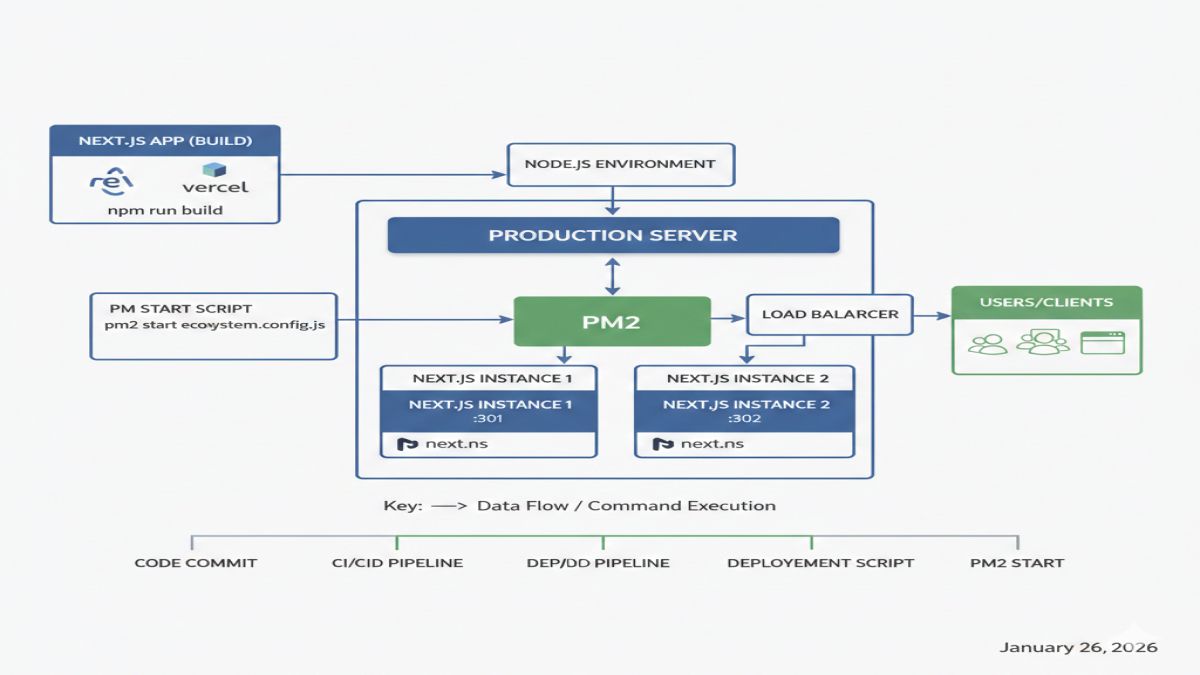
1. Prerequisites
Make sure your server has:
- Node.js (LTS recommended)
- npm or yarn / pnpm
- PM2 (process manager)
- A Linux server (Ubuntu is assumed below)
- Optional but recommended:
- Nginx (reverse proxy)
- Git
- SSL (Let’s Encrypt)
Install Node.js (LTS)
curl -fsSL https://deb.nodesource.com/setup_lts.x | sudo -E bash -
sudo apt install -y nodejs
Verify:
node -v
npm -v
Install PM2 globally
sudo npm install -g pm2
2. Prepare Your Next.js Application
Clone your repository
git clone https://github.com/your-username/your-nextjs-app.git
cd your-nextjs-app
Install dependencies
npm install
(or yarn install / pnpm install)
3. Configure Environment Variables
Create a production .env file:
nano .env.production
Example:
NODE_ENV=production
PORT=3000
DATABASE_URL=postgres://...
NEXT_PUBLIC_API_URL=https://api.example.com
⚠️ Never commit
.env.productionto Git.
4. Build the Next.js App
Next.js must be built before running with PM2.
npm run build
This creates the .next/ production build.
5. Start Next.js with PM2 (Recommended Way)
Option A: PM2 + next start (Most Common)
Run Next.js’s built-in production server:
pm2 start npm --name "nextjs-app" -- start
PM2 will execute:
npm run start
Which internally runs:
next start
Specify Port (optional)
pm2 start npm --name "nextjs-app" -- start -- -p 3000
6. PM2 Ecosystem File (Best Practice)
Create an ecosystem config for better control.
Create ecosystem file
nano ecosystem.config.js
Example ecosystem.config.js
module.exports = {
  apps: [
    {
      name: "nextjs-app",
      script: "node_modules/next/dist/bin/next",
      args: "start -p 3000",
      cwd: "/var/www/your-nextjs-app",
      instances: "max",        // enables cluster mode
      exec_mode: "cluster",
      autorestart: true,
      watch: false,
      max_memory_restart: "500M",
      env: {
        NODE_ENV: "production",
      },
    },
  ],
};
Start with ecosystem
pm2 start ecosystem.config.js
7. Enable PM2 Startup (Auto-restart on reboot)
pm2 startup
Follow the command PM2 outputs (usually sudo env PATH=...).
Then save the process list:
pm2 save
8. PM2 Useful Commands
pm2 list                # list running apps
pm2 logs nextjs-app     # view logs
pm2 restart nextjs-app
pm2 stop nextjs-app
pm2 delete nextjs-app
pm2 monit               # real-time monitoring
9. Using Nginx as a Reverse Proxy (Highly Recommended)
Install Nginx
sudo apt install nginx
Configure Nginx
sudo nano /etc/nginx/sites-available/nextjs
Example config:
server {
    listen 80;
    server_name example.com www.example.com;

    location / {
        proxy_pass http://localhost:3000;
        proxy_http_version 1.1;
        proxy_set_header Upgrade $http_upgrade;
        proxy_set_header Connection 'upgrade';
        proxy_set_header Host $host;
        proxy_cache_bypass $http_upgrade;
    }
}
Enable it:
sudo ln -s /etc/nginx/sites-available/nextjs /etc/nginx/sites-enabled/
sudo nginx -t
sudo systemctl restart nginx
10. Enable SSL (Let’s Encrypt)
sudo apt install certbot python3-certbot-nginx
sudo certbot --nginx -d example.com -d www.example.com
Auto-renew:
sudo certbot renew --dry-run
11. Deployment Workflow (Recommended)
Typical update flow:
git pull origin main
npm install
npm run build
pm2 restart nextjs-app
Or with ecosystem:
pm2 reload ecosystem.config.js
12. Common Issues & Fixes
❌ App crashes after reboot
✔ Run:
pm2 startup
pm2 save
❌ Port already in use
✔ Change port in:
next start -p XXXX- Nginx config
.env.production
❌ Environment variables not loading
✔ Ensure:
.env.productionexistsNODE_ENV=production- PM2 restarted after changes
13. Optional: Running in Standalone Mode (Next.js 13+)
In next.config.js:
module.exports = {
  output: "standalone",
};
Build:
npm run build
Run:
node .next/standalone/server.js
With PM2:
pm2 start .next/standalone/server.js --name nextjs-app
✅ Smaller footprint
✅ Faster startup
✅ Best for Docker & PM2
14. Production Checklist ✅
npm run buildsuccessful- PM2 running & saved
- Nginx reverse proxy enabled
- SSL configured
- Logs monitored
- Server reboot tested